For anyone who wants to know where their data lives
How Undan works
Your documents are files in your folders, your notes and tasks are Markdown, and what Undan knows about them sits in lines of text right next to them. No server, no Docker, no cloud of ours. Should Undan ever disappear, everything stays readable.
The file next to the app
On the left, what is literally on disk; on the right, what Undan makes of it. The files come from Jonas Falk's demo archive.
Documents are files
A folder is a folder, a file is a file. Names follow one rule, YYYY.MM - Description.ext: the date first, so everything sorts itself. Which folders you have is up to you; Undan proposes and only files on your click.
10_Business/
├── Clients/O'Sullivan/
│   ├── 2026.06 - Quote - walnut and painted kitchen with quartz worktop.pdf
│   ├── 2026.07 - Invoice - deposit (30 %), kitchen.pdf
│   └── 2026.09 - Invoice - second stage payment (40 %), worktop and materials.pdf
├── Receipts/2026/
│   ├── 2026.07 - Fuel receipt - van.jpg
│   └── 2026.08 - Fuel receipt - van.jpg
└── Suppliers/Hartmann Fittings/2026/
    └── 2026.09 - Invoice - soft-close hinges, drawer systems, handles (O'Sullivan).pdf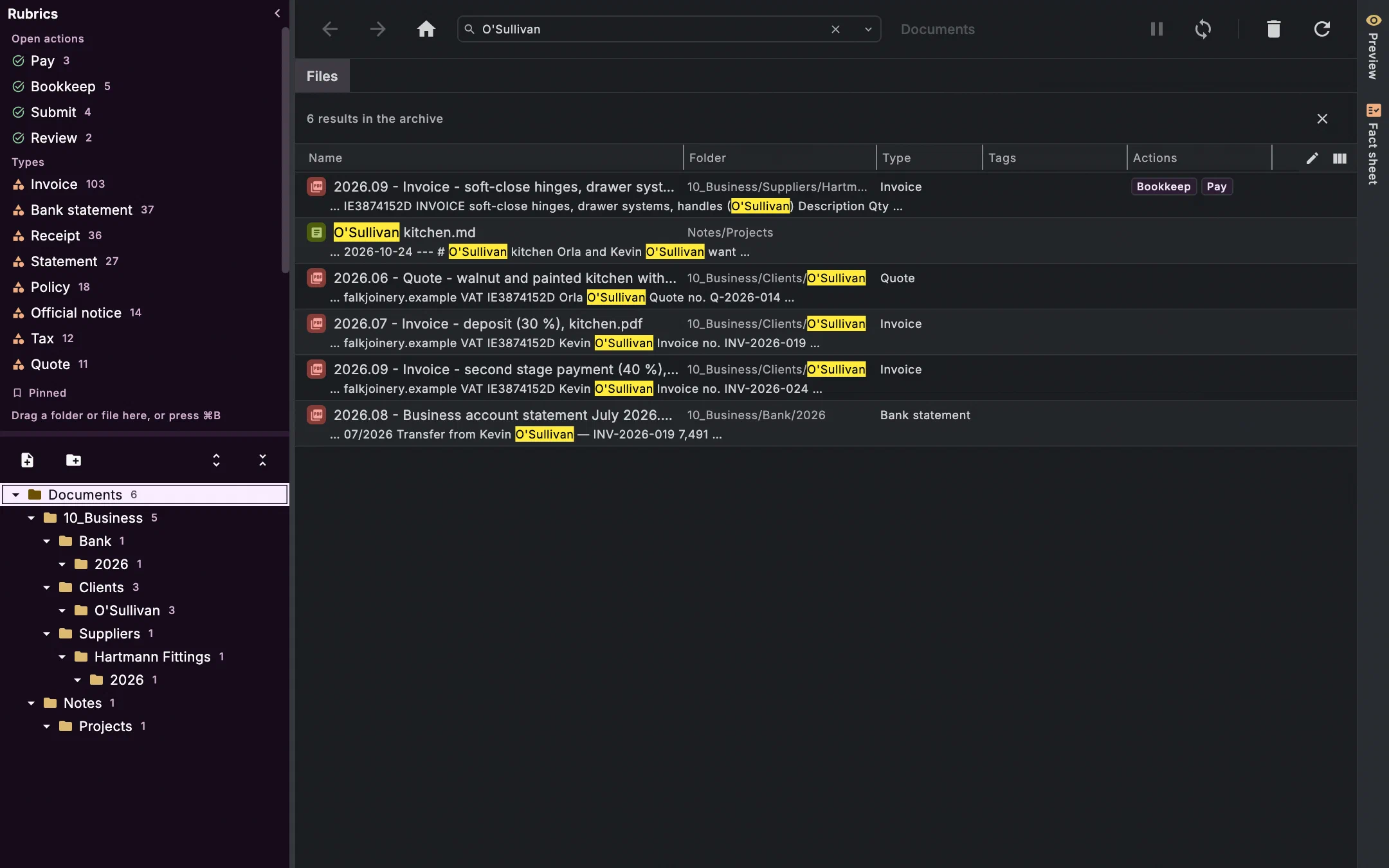
A task is a line
A task is a line in a note: checkbox, title, 📅 for the When — the day you mean to do it —, 🆔 for its ID. Everything else is in the journal: whether it's due, the time, the appointment, the recurrence, the attached documents. That's why the two fuel receipts on the task on the right aren't in the file. A line without 🆔 stays a plain checkbox; otherwise every shopping list would turn into tasks.
---
id: area-falk-joinery
tags: [area/falk-joinery]
---
# Falk Joinery

```projects
```

- [ ] Confirm preliminary tax figures to Siobhán 🆔 g4mhh
- [ ] Quote — utility room for Tom Brennan 🆔 hxvkz
- [ ] Quote — reception counter for Nash Dental 🆔 arn25
- [ ] Drawings — Kinsale bookcases 📅 2026-10-05 🆔 2ukaa
- [ ] File VAT return July/August 🆔 yd36b
- [ ] Send Siobhán the two missing fuel receipts 📅 2026-09-22 🆔 52x2u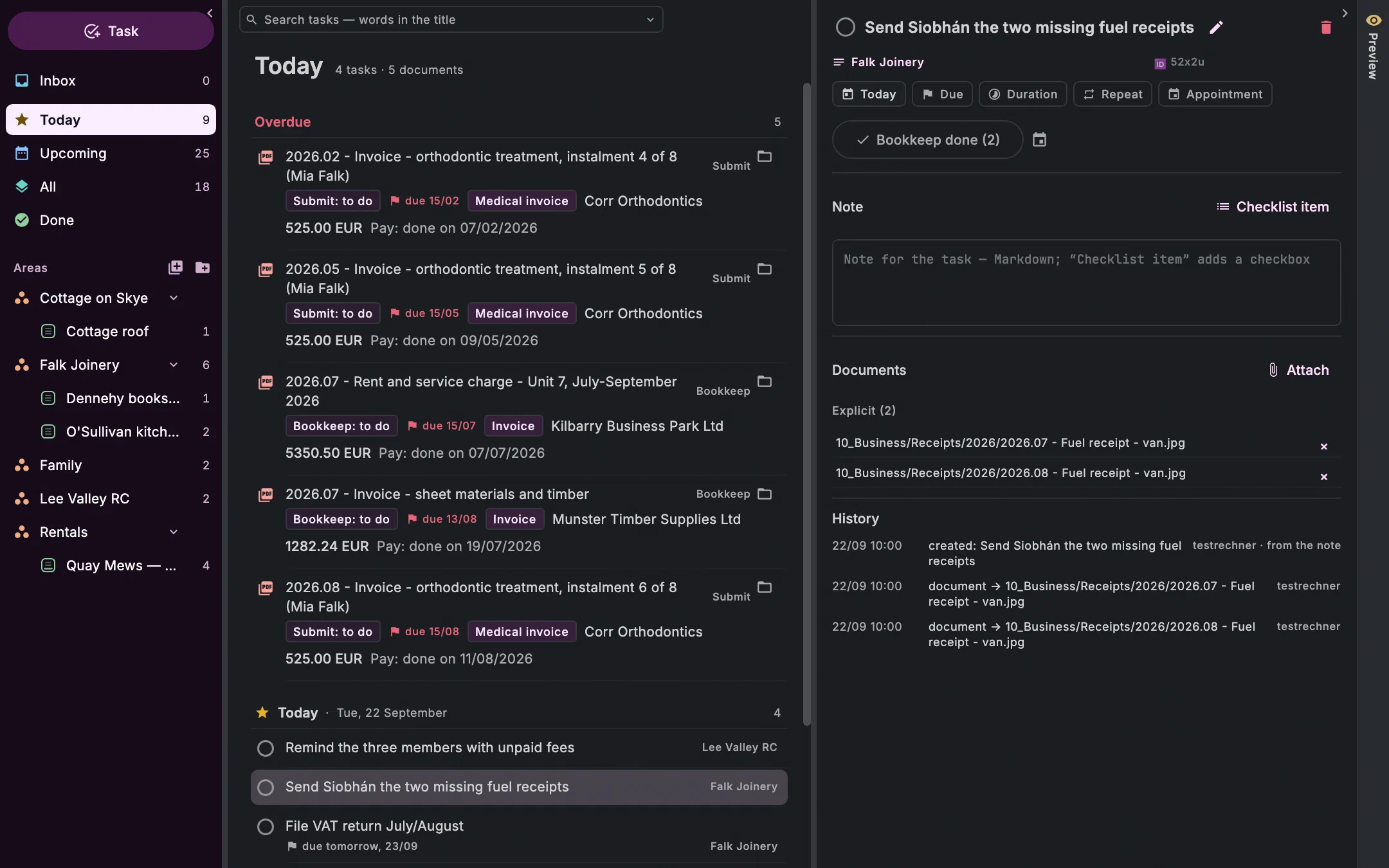
A project is a note with an end
A project is a note with a project/ tag and an end: in its header; the checkboxes in it are its tasks. The first line here has no date in the file — that it's due on 25 September is known to the journal. A deadline can also be relative to the end: ⏳ -4w means four weeks before. Undan works out the date and writes it to the journal, the line stays relative; if the end moves, the deadline moves with it.
---
id: osullivan-kitchen
tags: [project/osullivan-kitchen]
area: Falk Joinery
start: 2026-05-14
end: 2026-10-24
---
# O'Sullivan kitchen

Orla and Kevin O'Sullivan want a walnut and painted kitchen with a quartz worktop. Quote in June, accepted in July; worktop and fittings ordered in September; installation from 12 October.

- [ ] Book Ciarán for the appliance circuits 🆔 7cek6
  Week of 19 October.
- [ ] Chase the second stage payment 📅 2026-09-26 🆔 xgiv6
Sync, and how conflicts stay small
Syncthing syncs the folder between your devices, directly from device to device. If two devices change the same thing before they meet again, there is a conflict. Undan is built so that conflicts are rare and stay small.
Journals only grow
Facts, tasks and emails live in journals that are only ever appended to. When two devices write at the same time, both versions are merged, and the newest line per field wins.
A conflict copy is not a note
When two versions of a note meet, Syncthing puts a copy next to it. Undan doesn't read it as a second note: no duplicate tasks, no second project, nothing for links to point at.
Merge where it's safe
One device checks every minute and merges the copy into the original: tasks by their ID, as the journal knows them, other text against the last common version. The copy then goes to the bin;
Ctrl+Z⌘Ztakes both back.Ctrl+Z ⌘Z
What isn't safe stays put
If both sides changed the same spot differently, the copy stays, and the settings show you where. Nothing is overwritten silently.
Never save over what just arrived
The editor only saves a note while the version you started from is still on disk. If Syncthing has brought a newer one in the meantime, it won't write over it.
What lives where
The dot folder .undan/ is the only place in your documents folder that Undan writes to itself. It is part of your content — back it up and sync it along.
Your documents
In your documents folder, as before, in your folders. Tree, search and index skip anything whose name starts with a dot.
What Undan knows about them
Type, amount, due date, actions, tags: as a journal in
.undan/facts/, one file per month, one line per statement, with time, source and computer name. Facts are attached to a file's content, not its path — renaming and moving it, even in another program, changes nothing.Notes and their ID
Markdown, readable in any editor. Every note carries an
id:line at the top, and its facts hang on that; rename it, move it, edit it in Obsidian — the ID stays.Your words
Which types, fields and actions exist is in
.undan/vocabulary.md, a text file you can edit yourself. Next to it: bookmarks, history, bin and your dictionary.Mail
The emails themselves in
.undan/mail/journal/, one file per month and computer, attachments named by their content. Read, archived and labels stay with your provider.What only your computer needs
The index for search and lists, the editor's drafts, your conversations with the AI: in
~/.undan/instances/, per computer. The index can be rebuilt at any time.
Questions
Can I open my notes in Obsidian?
Yes, they're Markdown files. Task lines follow the Obsidian Tasks notation; tick a box there and Undan reads it as done, and markers like 🔁 stay where they are. What differs: in Undan 📅 means When, ⏳ is relative to a project's end, and due date, time and recurrence live only in the journal.
Do I need a server?
No. Undan is an application on your computer and an app on your phone. No server, no Docker.
What happens if Undan goes away?
Your folders stay as they are, the notes are Markdown, the journals lines of text. Any other program can read them.
Join the waitlist
We'll write to you when there's something to try — and otherwise not.